

Event Planner

Before and After Post Ideas for Event Planners

Stop struggling for content. Use these specific before after post ideas for event planners to show off your transformation skills and book more clients.

4 min read Updated May 28, 2026 Used by 1,000+ businesses
Before and After Post Ideas for Event Planners
BrandZillaBrandZilla EditorialReviewed by marketing operators

Most event planners make the mistake of only showing the "finished product." While the professional gallery of the centerpiece is great, it doesn't actually show the value of your labor. Clients don't just pay for a pretty room; they pay for the transformation. They pay for your ability to walk into a cold, empty community center or a chaotic backyard and see a luxury experience.

Reality check: Your clients are stressed because they can't visualize. Showing a "Before and After" is the fastest way to build trust because it proves you aren't just a decorator—you are a problem solver who can handle the "Before" mess.

The key to a high-performing post isn't just the photo; it's the story of the transition. Whether it’s a rainy layout change-up or a last-minute table swap, that friction is what makes the final result look so much more impressive. Use these practical ideas to start showing the 'why' behind your 'what'.

Quick tips

1

Highlight the Benefit

Don't just show the change; say how it helped the client (e.g., 'We saved 2 hours of setup time').

2

Don't Over-Edit the Before

Natural light is your best friend for 'After' photos, but 'Before' photos can be gritty—it adds to the drama.

3

Ask for Input

Use the 'Before' photo to ask a question like 'How would you fix this layout?' to get people commenting.

4

Try a Vertical Split

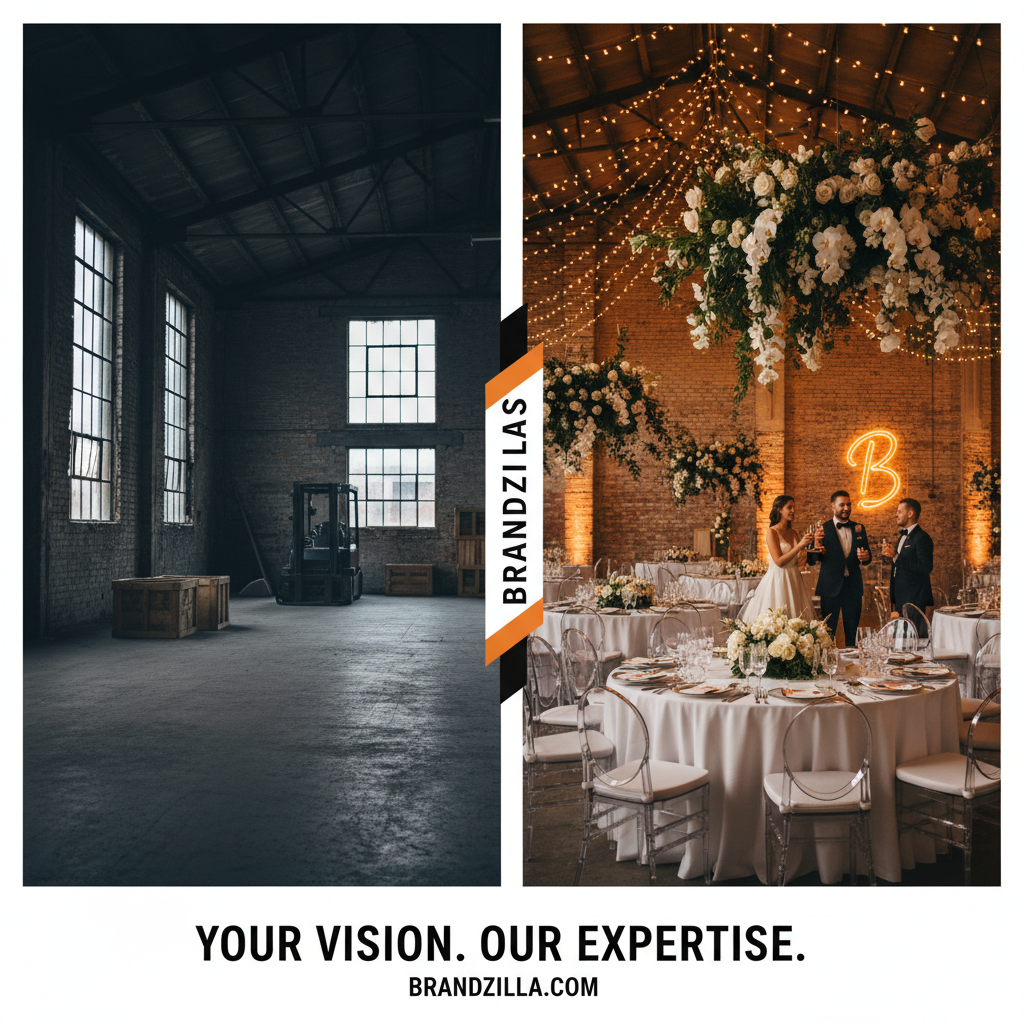
Stack your 'Before' and 'After' vertically in a single graphic for a high-impact Pinterest or Story post.

Stay consistent without hiring a social media manager

A simple weekly content system that keeps your business visible and trusted online — no daily improvisation.

No spam. Unsubscribe anytime.

Transforming Physical Spaces

These are the bread and butter of event planning. You want to highlight the physical change of the space to prove that your fee is worth the labor.

What actually works: Frame your 'Before' shot from the exact same angle as your 'After' shot. This makes the transition feel like magic when the user swipes or the Reel transitions.

  • The Loading Dock to Luxury: Show the crates and chaotic boxes in the hallway, then the clean, finished entrance.
  • The Table Setting Evolution: A bare wooden table vs. the fully layered place setting with menu cards and florals.
  • The Lighting Flip: A room with harsh fluorescent 'work' lights vs. the same room with your custom mood lighting/candles.
  • The Backyard Takeover: A standard grass lawn vs. a fully floored, tented, and draped lounge area.
  • The 'Messy' Prep Station: Your kit spread out with tape, scissors, and wire vs. the flawless centerpiece it created.
Example 1

Empty warehouse vs. Industrial Chic wedding reception.

Example 2

Folded linens in plastic wrap vs. perfectly steamed and draped banquet tables.

Example 3

A chaotic Pinterest board vs. the real-life execution of the main stage.

Example 4

Rainy 'Plan B' layout vs. the cozy, indoor candlelit ceremony.

Example 5

Tangled fairy lights vs. a perfect canopy of stars above the dance floor.

Showing the Logistics & Stress Relief

People often forget that event planning is 90% logistics. Use your content to show the 'Before' of the mental load you took off the client.

Local business example: A planner in Dallas posted a photo of a bride's 15-page 'To-Do' list marked 'Before' and a photo of the bride laughing with a cocktail marked 'After'. It went viral because it hit the emotional pain point.

  • The Spreadsheet Stress: A screenshot of a messy, color-coded master schedule vs. the smooth execution of the first dance.
  • The Vendor Maze: A list of 15 different contact numbers vs. one 'Point of Contact' (You).
  • The Floor Plan Sketch: An original hand-drawn napkin sketch vs. the 3D render vs. the live event.
  • The Rain Plan: A weather radar app showing 80% rain vs. the beautiful covered backup space you secured.
  • The Budget Breakdown: A pile of confusing invoices vs. a clean, organized final budget summary for the client.
Example 1

Stressful PDF contract stack vs. the 'It's Handled' smile on the event day.

Example 2

A messy seating chart board vs. guests finding their places perfectly.

Example 3

100 unread emails from vendors vs. your 'Single Point of Contact' dashboard.

Example 4

The chaotic morning-of 'Must Do' list vs. a calm, on-time ceremony start.

Example 5

Post-it note brainstorm vs. the cohesive 'Brand Colors' at a corporate gala.

Micro-Details That Make the Difference

Sometimes a total room overhaul is too much to capture. Focus on the 'micro-transformations' that show your taste and eye for design.

Quick win: Next time you are setting up, film a 3-second clip of a bare chair, then a 3-second clip of that chair with a sash and a sprig of greenery. That is a perfect 6-second Reel.

  • The Bouquet Glow-Up: Raw stems in a bucket vs. the tied, ribboned, breathtaking bridal bouquet.
  • The Signage Transformation: A plain acrylic board vs. the hand-lettered gold foil welcome sign.
  • The Bar Setup: A cluttered back-bar with boxes vs. a curated signature cocktail station with garnished glassware.
  • The Gift Table: A catch-all folding table vs. a styled vintage trunk with florals and a custom card box.
  • The Dessert Display: Trays of cookies in plastic bakery boxes vs. a multi-tiered dessert tower with custom labels.
Example 1

Plastic rental chairs vs. the same chairs with velvet cushions and sashes.

Example 2

Store-bought candles vs. a custom-scented, styled candle ensemble on a mantle.

Example 3

Plain white napkins vs. a 'fleur-de-lis' fold with a sprig of rosemary.

Example 4

A blank chalk board vs. a hand-illustrated 'Order of Events' sign.

Example 5

Bulk flowers in cardboard vs. a lush, overflowing floral arch.

Copy-paste AI prompt pack

Drop these straight into your post — or generate fresh ones with BrandZilla.

Captions

  • The blank canvas vs. the final masterpiece. 🎨 When we first walked into [Venue Name], we knew we had our work cut out for us. Swipe to see how we handled [specific challenge].
  • POV: You hired an expert to handle the logistics so you could focus on the champagne. 🥂 From empty floor plan to the party of the year.
  • It’s all in the details. The 'Before' was a stack of boxes and a vision board. The 'After' is exactly what [Client Name] dreamed of. Which detail is your favorite?

Hooks

  • You won't believe this was the same room 3 hours ago.
  • Why you actually need a professional event planner (in 2 slides).
  • From ‘What do we do?’ to ‘Wow.’
  • The one thing my client was most worried about... and how we fixed it.

Hashtags

#EventPlannerLife#EventTransformation#WeddingPlannerTips#BeforeAndAfterPostIdeasForEventPlanners#EventDesign#BehindTheScenesEvent#PartyPlanningTips#VenueTransformation#SmallBusinessMarketing#EventProfs

Questions business owners actually ask

Real objections from real operators — answered straight.

BrandZillaBrandZilla EditorialReviewed by marketing operators

Free tools to keep you consistent

Quick utilities for the moments between full posts.

Most businesses stop posting after 2 weeks

BrandZilla gives small businesses a simple weekly content system — so you stay visible, build trust, and get more enquiries without hiring a social media manager.

More for Event Planner

Same topic, other industries

From the blog