8 Low‑Tech Ways to Collect Customer Contacts in Your Store (No Ads Needed)
You’re getting foot traffic but not their contact info. These eight low-tech methods make collecting emails and phone numbers part of the customer experience — no big software or ad spend required.
7 min read
BrandZilla EditorialReviewed by marketing operators· Updated Jul 22, 2026· 7 min read
You get people in the door. They buy something. Then they disappear.
If your marketing starts and ends with social posts and a “Call us” button, you’re leaving repeat visits and referrals on the table. The simplest fix: collect contact details at the moment they care — inside your store.
This piece gives eight low-tech, tested ways to collect customer contacts that a small shop, cafe, salon, or local service can implement in days. No developer, no ad budget, no complicated integrations.
The mindset: make asking normal and useful
Most small businesses treat contact-collection like a data grab. It doesn’t have to be awkward. The rules that win:
Ask where it helps the customer (receipt, waitlist, loyalty).
Give a clear, immediate benefit (10% off next visit, free consult, skip-the-line SMS).
Keep the ask to one line and one choice: email or phone number.
Reality check: Most small businesses post 3x then quit. Consistency beats creativity 9 times out of 10.
8 low-tech ways to collect contacts (and exact wording to use)
Receipt offers
Attach a printed offer at the bottom of receipts: a simple QR and one-line benefit. Works at POS and for takeout.
Exact receipt line: “Sign up for 10% off your next visit. Scan QR or text JOIN to 555-1234.”
Why it works: receipts are kept. The promise of immediate savings converts casual buyers into leads.
Counter QR with a clear value
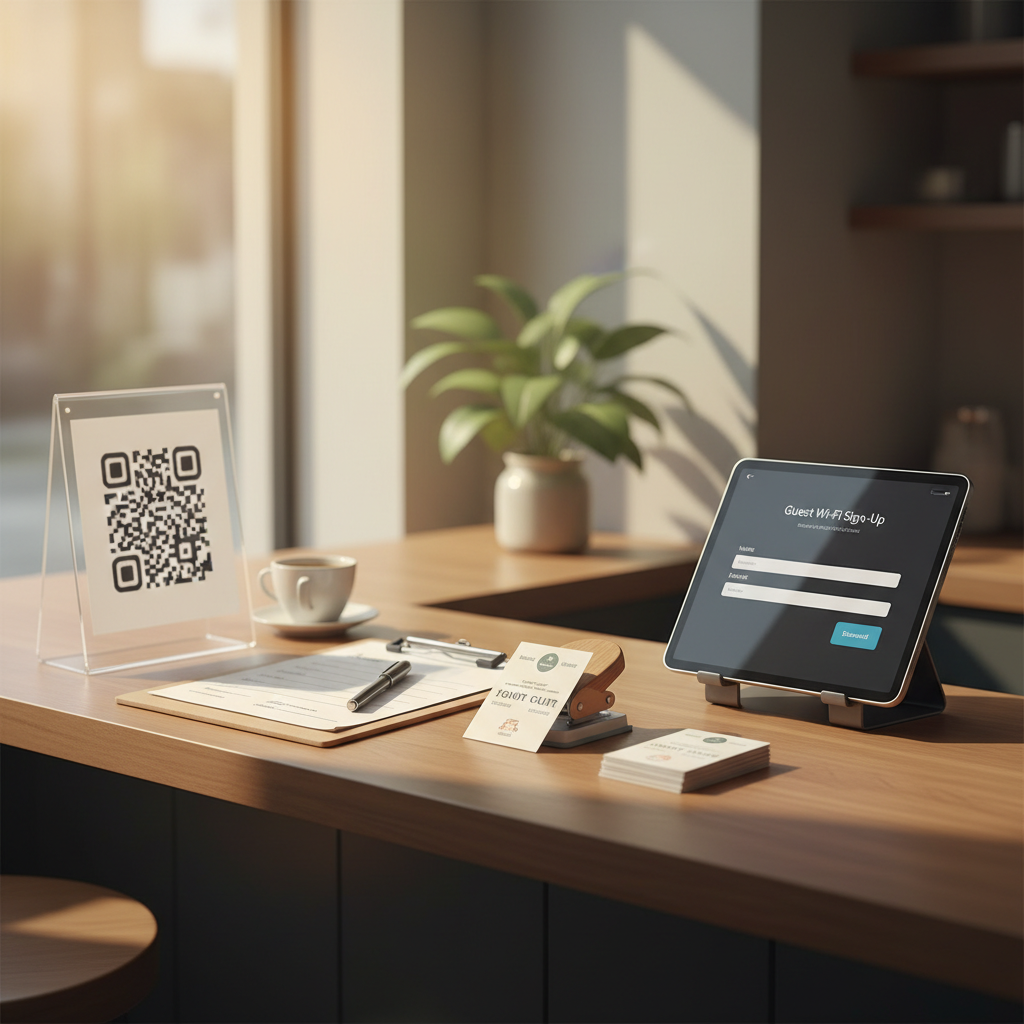
Put a small tent card near the register with a large QR and 5‑word benefit.
Copy for the tent: “Get a free size upgrade — sign up here.” QR loads a one-field form (email or phone).
Waitlist / booking text capture
If you use a paper or digital waitlist, collect a phone number as standard and add permission to text. Train staff to say the line below.
Staff script: “We’ll text you when your table’s ready—what number should I use? You’ll also get a one-time 15% off for joining.”
Wi‑Fi splash page (low friction)
Offer free Wi‑Fi that asks for an email to unlock. Set expectation: “We’ll send one weekly deal.” Keep it one checkbox for consent.
Technical note: many cheap routers and guest Wi‑Fi services support a simple splash capture — no developer required.
Business-card swap with an incentive
When customers pay, hand them a small referral card: “Give this to a friend for $10 off. Drop your email on the back to get both rewards.”
Loyalty punch cards with email option
Keep the classic punch card, but offer a digital backup: “Lose your card? We'll email your punches — leave an email to opt in.” This converts the physical into a database.
Post-visit receipt follow-up (manual but effective)
Ask for permission at checkout to send a photo receipt or care instructions by email. This is useful for salons, gyms, and service businesses.
Exact checkout line: “Would you like a copy of today’s style notes/receipt by email? We’ll also send a one-time 20% off for returning within 30 days.”
Register-for-events or mini-workshops
Run a 20‑minute demo or how-to session in the store. Require sign-up with an email to reserve a spot. Even one short session a month builds a list of interested locals.
Quick win: Repurpose one customer review into a 3-post mini series this week.
Scripts, micro-forms and what to ask (keep it under 10 seconds)
The more fields you ask for, the fewer people sign up. Keep forms single-field with a consent checkbox.
Recommended micro-form flow (mobile):
Field 1: Email or phone (label it clearly).
Checkbox: “Yes, send 1 weekly deal + important updates.”
Button: “Get 10%” or “Reserve my spot” — use benefit-focused CTA.
Exact button copy examples:
“Get 10%” (for a discount)
“Save my seat” (for a workshop)
“Send receipt” (post-visit copy)
If you must ask for name, make it optional.
Two small workflows that actually convert (copy-and-paste)
Workflow A — New-customer coupon (best for retail/cafe)
Customer buys. Staff hands receipt with QR or texts JOIN.
Customer signs up with email on the one-field form.
Immediate auto-email: Subject “Your 10% code — thanks for stopping by” with a code valid for 30 days.
7 days later: friendly reminder email with a social proof line and hours.
Email subject line: “Your 10% code — 30 days to use it”
Email body (short): “Thanks for visiting! Use code LOCAL10 on your next purchase. We’re open Tue–Sun, 8–4. Show this email at the counter.”
Workflow B — Waitlist text to booking (best for restaurants, salons)
Add phone to waitlist with opt-in language.
Text when table/stylist is ready + one-line offer to rebook: “Your table’s ready. Reply YES to confirm. Want 10% off your next visit? Reply BOOK and we’ll reserve a spot.”
If they reply BOOK, follow up with a confirmation and a link to a 1-step booking form.
Example SMS: “Hi Sam — your table’s ready. Reply YES to confirm or BOOK for 10% off your next visit.”
Common mistake: Treating Instagram captions like tweets — context outperforms one-liners for local businesses.
A mini-example (realistic, replicable)
Cornerstone Bakery — 14-seat shop in Brooklyn
Problem: steady walk-ins (avg 40/day) but no repeat tracking.
Tactic: printed receipt QR offering “Free pastry on your 5th visit — join our list.” One-field email capture with a 5-visit loyalty counter.
Result after 30 days: 48 new emails, 12 customers returned to use loyalty reward, estimated extra revenue $720 (average $60/month from repeat visits). The owner spent ~90 minutes setting up forms and printing receipts.
This is the kind of low-effort, measurable win that scales.
Measuring success without marketing dashboards
Track three simple numbers weekly:
New contacts added
% of contacts who used an offer within 30 days
Revenue from returning customers linked to offers
If you add 50 contacts/month and 20% return and spend $50 on average, that’s $500/month — not bad for a simple receipt QR.
Steal this template: "We help [audience] [outcome] without [pain]. Here's how →"
Implementation checklist (two-week sprint)
Week 1 — Quick setups
Print QR tent cards and receipt slips.
Set up one-field mobile form (email or phone) and automated welcome message.
Train staff on the 10-second lines (pick one script per station).
Week 2 — Test and tweak
Run one promo (10% or free size upgrade) for 7 days and track signups.
Ask staff what’s working and adjust wording.
Count new contacts and follow up with the automated email or SMS.
Practical shortcut: You can build this system manually — or use BrandZilla to stay consistent without hiring a social media manager.
Privacy and permission — keep it simple and legal
Always ask for explicit consent to send marketing. Use a short checkbox and keep records. For most countries, a single opt-in with a clear purpose (weekly deals, booking notices) is sufficient for small businesses.
If you use SMS, include opt-in language and an easy STOP instruction in your messages.
Final practical reminders
Make the benefit obvious and immediate.
Train staff; the best scripts are those actually used.
Start small: pick two methods from above and run them for 30 days.
If you want to skip the setup headaches, BrandZilla offers templates and workflows that match these exact tactics — used quietly, without fuss.
Small systems plus daily habits beat one-off hacks. Get a simple capture running this week, follow up within 24 hours, and you’ll start to see real, local revenue come back through the door.
FAQ
Q: What if I don't have time to post every day?
A: You don’t need daily posts to collect contacts in-store. Focus on in-person asks and one automated follow-up email. Next step: pick one capture method (receipt QR or counter QR) and test for two weeks.
Q: Can I reuse old content without looking repetitive?
A: Yes — reuse customer photos, testimonials, and event recaps in emails and on counter cards. Rotate offers so returning customers see different reasons to come back. Next step: republish one customer photo with a new offer this week.
Q: Do small businesses actually need a content calendar?
A: Not always. For in-store contact capture, a simple checklist (daily ask, weekly follow-up) is enough. If you start email promotions, a one-month calendar helps avoid overlap. Next step: schedule one welcome email and one promotional email per month.
Q: How long before posting consistently actually brings in customers?
A: For in-store capture, you can see returns in 2–4 weeks if you follow up quickly and offer real value. Next step: launch one capture and send the welcome offer within 24 hours.
Closing thought
Collecting contacts is not a marketing add-on — it’s part of running your shop. Make the ask normal, promise value, and follow up. A few simple changes this week will give you a list that pays dividends for months.
The real objections — answered straight, no fluff.
BrandZilla Editorial Team
SMB MarketingContent Strategy
Practical playbooks written and reviewed by people who actually run content programs for small and local businesses — not generic AI output. Every guide is pressure-tested against what real operators do on Instagram, Facebook, LinkedIn and Google.
Used by 1,000+ businessesLast updated Jul 22, 20267 min read
Get weekly content ideas for your business
Join business owners getting practical, ready-to-post BrandZilla content prompts every week. No spam.